
Hutao Database / Abyss Statistics
Snap Hutao Manjusaka provides two main Spiral Abyss challenge statistics functions:
- Schedule Details: Helps players save data for each period of the Spiral Abyss challenge for personal data review and statistics.
- Current Statistics: Displays Spiral Abyss data from all players who have uploaded it to the Hutao Database, providing players with a reference for character and team usage.
- "Current Statistics" relies on the "Schedule Details" data submitted by players.

Viewing Abyss Data
Data Scope Limitations
All calculations are based on player data uploaded to the Hutao Database and may not represent the average data of all Genshin Impact players. It is for reference only.
Data Refresh Cycle
- Spiral Abyss statistics data (character usage rate, character appearance rate, team appearance) are automatically updated at 4 AM on the 1st and 16th of each month in the time zone of the account's server.
- If a user does not re-upload data within 30 days, their character ownership records will be cleared. :::
- Click "Spiral Abyss" in the left menu bar and select the "Current Statistics" tab.
- View Data:
- Character Usage Rate:
- Formula: Character Usage Rate = Number of times a character appears in the current floor[^first] / Total number of records of players who own that character on that floor.
- Character Appearance Rate:
- Formula: Character Appearance Rate = Number of times a character appears in the current floor[^first-2] / Total number of records on the current floor.
- Character Ownership Rate:
- Formula: Character Ownership Rate[^third] = Number of players who own the character / Total number of players.
- Team Appearance Count: Displays the ranking of team combinations by their number of appearances.
- Character Usage Rate:
Uploading Spiral Abyss Data
Using the Snap Hutao Manjusaka Client
After successfully submitting data for the first time, you will receive a 3-day "Snap Hutao Manjusaka Cloud Wish Record Backup Service" privilege as a reward (even if you have not cleared Floor 12).
- Click "Spiral Abyss" in the left menu bar.
- Click "Refresh Data" in the upper right corner to ensure Snap Hutao Manjusaka has obtained the latest personal Spiral Abyss data.
- Click the "Upload Data" button to submit the data.
- Uploading may take a few seconds. A success message will be displayed when complete.
Using a Browser
信息
This method does not apply to HoYoLAB.
- Open the JavaScript script link and copy the code.
- Create a new bookmark in your browser:
- Enter a suitable name.
- Paste the copied code into the bookmark URL.
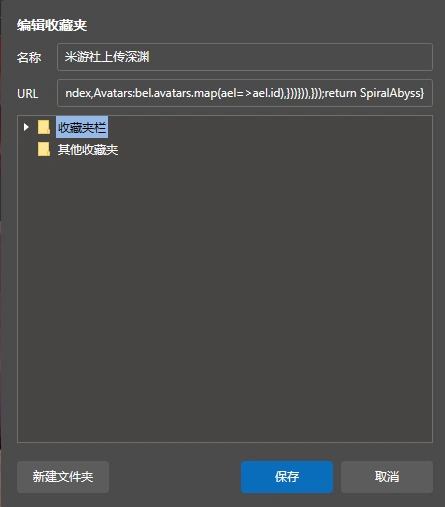
- Open MiYouShe and wait for the page to load, then click the bookmark.
- Confirm the upload prompt to complete the upload.
Data Sharing
Snap Hutao Manjusaka jointly maintains the Hutao Database with other developers. Users can view Spiral Abyss statistics and upload data in multiple applications. Currently, collaborating applications include:
title: Miao-Plugin for Yunzai-Bot
desc: QQ Robot Miao-Plugin
logo: /images/202312/miao-plugin-logo.webp
link: https://github.com/yoimiya-kokomi/miao-plugin/tree/mastertitle: Genshin Pizza Helper
desc: Genshin Impact tool for MacOS/iOS
logo: /images/202312/genshin-pizza-helper-logo.webp
link: https://apps.apple.com/cn/app/%E6%8A%AB%E8%90%A8%E5%B0%8F%E5%8A%A9%E6%89%8B/id1635319193title: Ysin
desc: WeChat mini-program Ysin
logo: /images/202312/ysin-logo.png
link: https://yuanshen.xin/[^first]: If the same character appears multiple times within different chambers of the current floor, they are only counted once.
[^first-2]: If the same character appears multiple times within different chambers of the current floor, they are only counted once.
[^third]: Having the character counts as ownership, even if they did not appear in the Spiral Abyss. Uploading a record counts the player in the total player statistics.